In this part, we’ll enhance our Task Manager app by parsing JSON responses and handling different types of errors. We’ll use Dio’s built-in error handling mechanisms.
You can find the source code of the entire app here: dio_tasker
Parsing JSON Responses:
We’ll update our ApiService to parse JSON response into a list of task objects.
- Create a Task Model:
First, we’ll create a new file lib/models/task.dart
class Task {
  final int id;
  final String title;
  final bool completed;

  Task({required this.id, required this.title, required this.completed});

  // Factory method to create a Task from JSON
  factory Task.fromJSON(Map<String, dynamic> json) => Task(
        id: json['id'],
        title: json['title'],
        completed: json['completed'],
      );
}
- Update
ApiService:
Now, let’s modify the lib/services/api_service.dart to use the Task model:
import 'package:dio/dio.dart';

import '../models/tasks.dart';

class ApiService {
  // Create an instance of Dio
  final _dio = Dio();

  // Method to fetch tasks from the API
  Future<List<Task>> fetchTasks() async {
    try {
      // Make a GET request to the API endpoint
      final response =
          await _dio.get('https://jsonplaceholder.typicode.com/todos');
      // Parse the response data into a list of Task objects
      return (response.data as List)
          .map((task) => Task.fromJSON(task))
          .toList();
    } catch (e) {
      // Handle errors
      throw Exception('Failed to load tasks');
    }
  }
}
Handling Different Types of Errors:
Now we’ll handle network errors, server errors and other types of errors.
- Update
ApiServiceto Handle Errors:
Let’s modify lib/services/api_service.dart to handle different types of errors:
import 'package:dio/dio.dart';

import '../models/tasks.dart';

class ApiService {
  // Create an instance of Dio
  final _dio = Dio();

  // Method to fetch tasks from the API
  Future<List<Task>> fetchTasks() async {
    try {
      // Make a GET request to the API endpoint
      final response =
          await _dio.get('https://jsonplaceholder.typicode.com/todos');
      // Parse the response data into a list of Task objects
      return (response.data as List)
          .map((task) => Task.fromJSON(task))
          .toList();
    } on DioException catch (dioException) {
      // Handle Dio Exceptions
      if (dioException.type == DioExceptionType.connectionTimeout) {
        throw Exception('Connection Timeout');
      } else if (dioException.type == DioExceptionType.receiveTimeout) {
        throw Exception('Receive Timeout');
      } else if (dioException.type == DioExceptionType.badResponse) {
        throw Exception(
            'Received invalid status code: ${dioException.response?.statusCode}');
      } else {
        throw Exception('Something went wrong');
      }
    } catch (e) {
      // Handle other errors
      throw Exception('Failed to load tasks');
    }
  }
}
Update UI to Display Errors:
We’ll update the UI to display error messages when fetching tasks fails.
- Modify TaskListScreen:
Let’s update lib/main.dart to display error messages:
import 'package:dio_tasker/services/api_service.dart';
import 'package:flutter/material.dart';

void main() {
  runApp(const MyApp());
}

class MyApp extends StatelessWidget {
  const MyApp({super.key});

  @override
  Widget build(BuildContext context) {
    return const MaterialApp(
      home: TaskListScreen(),
    );
  }
}

class TaskListScreen extends StatefulWidget {
  const TaskListScreen({super.key});

  @override
  State<TaskListScreen> createState() => _TaskListScreenState();
}

class _TaskListScreenState extends State<TaskListScreen> {
  // Create an instance of ApiService
  final ApiService _apiService = ApiService();

  // List to hold the fetched tasks
  List<dynamic> _tasks = [];

  // Variable to hold error messages
  String? _errorMessage;

  @override
  void initState() {
    super.initState();
    // Fetch tasks when the widget is initialized
    _fetchTasks();
  }

  // Method to fetch tasks and update the state
  void _fetchTasks() async {
    try {
      // Fetch tasks from the API
      final tasks = await _apiService.fetchTasks();
      // Update the state with the fetched tasks
      setState(() {
        _tasks = tasks;
      });
    } catch (e) {
      // Update the state with the error message
      setState(() {
        _errorMessage = e.toString();
      });
    }
  }

  @override
  Widget build(BuildContext context) {
    return Scaffold(
      appBar: AppBar(
        title: const Text('Task Manager'),
      ),
      body: _errorMessage != null
          ? Center(
              child: Text(_errorMessage!),
            )
          : ListView.builder(
              // Set the number of items in the list
              itemCount: _tasks.length,
              // Build each item in the list
              itemBuilder: (context, index) {
                return ListTile(
                  // Display the task title
                  title: Text(_tasks[index].title),
                );
              },
            ),
    );
  }
}
Output:
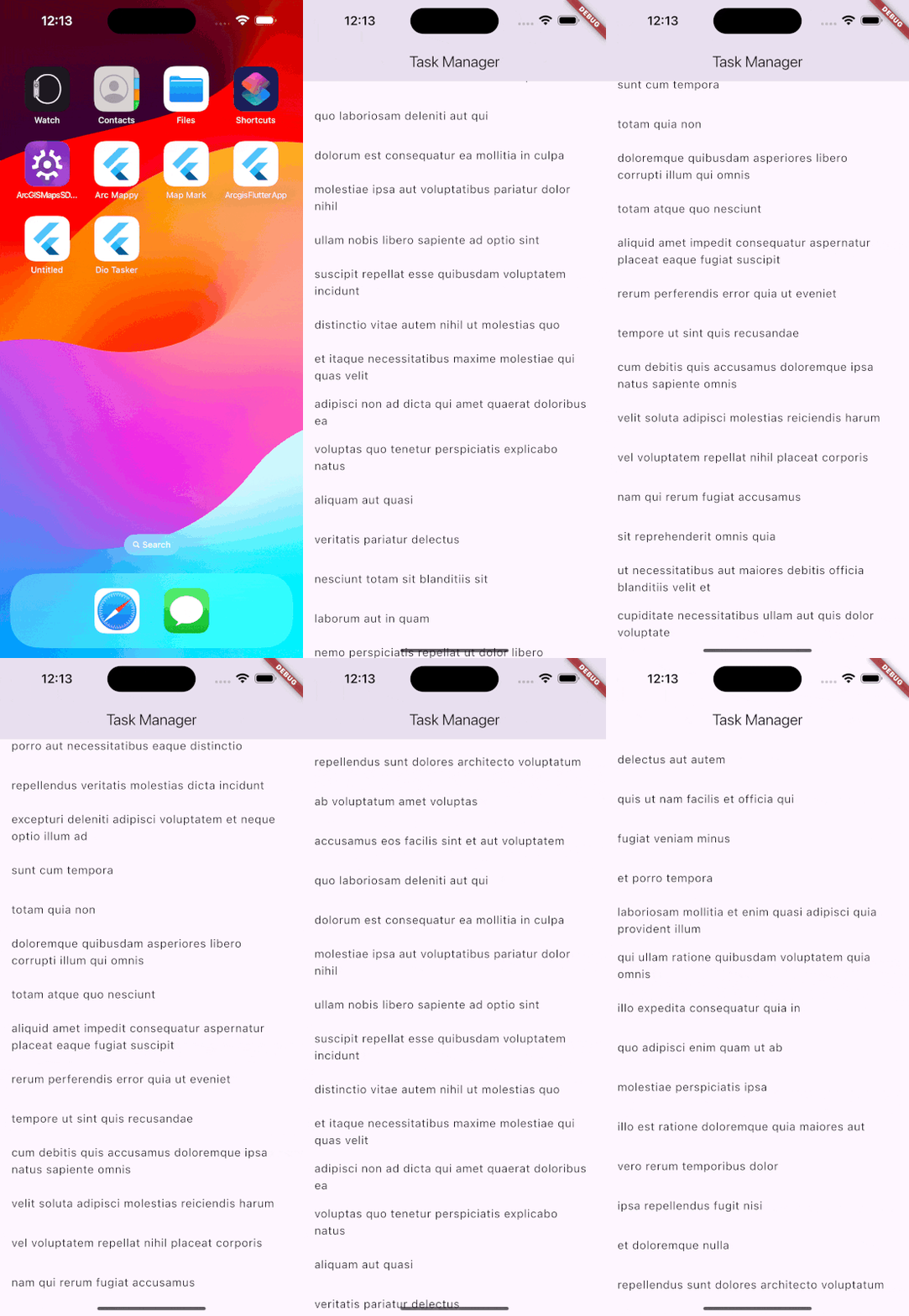
- Without Any Errors
Allright so let’s run the app and see if we get any errors.
- With an Error:
Now we’ll change the URL to an invalid URL and see if the app can handle that. So instead of using https://jsonplaceholder.typicode.com/todos we’ll use https://jsonplaceholder.typicode.com/to. Which is an invalid URL. And here’s the output:
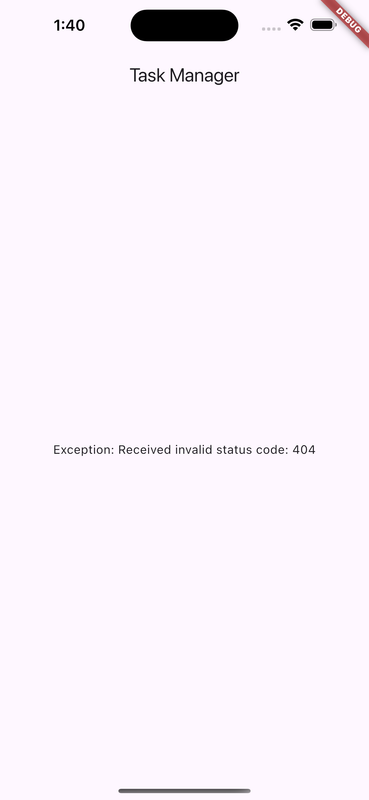
Perfect. As we can see, our app is able to handle errors.
You can find the source code for the above example here: dio_tasker/02-handling-response-errors.
Comments
Join the discussionNo comments yet. Be the first to comment.