Go Router + Riverpod Tutorial 2: Conditional Redirection with Guards

In our previous article we have covered basic redirect. Now let's take a look at Conditional Redirection.
What are Guards ?
Guards: Guards are essentially functions that you can define to determine whether a particular redirection should happen or not.
They evaluate specific conditions (like user authentication status, user roles, or data availability) and return a new route if the conditions are met,
If returned
nullthey proceed with the default route.
Tutorial:
First let's define two additional pages:
Profile Page:
class ProfilePage extends ConsumerWidget {
  const ProfilePage({super.key});

  @override
  Widget build(BuildContext context, WidgetRef ref) {
    return Scaffold(
      appBar: AppBar(
        title: const Text('Profile'),
      ),
      body: Center(
        child: Column(
          mainAxisAlignment: MainAxisAlignment.center,
          children: [
            const Text(
              'Profile Page', style: TextStyle(fontSize: 24),
            ),
            const SizedBox(height: 10),
            ElevatedButton(
              onPressed: () {
                ref.read(authProvider.notifier).logout();
              },
              child: const Text('Logout'),
            ),
          ],
        ),
      ),
    );
  }
}
Admin Page:
class AdminPage extends ConsumerWidget {
  const AdminPage({super.key});

  @override
  Widget build(BuildContext context, WidgetRef ref) {
    return Scaffold(
      appBar: AppBar(
        title: const Text('Admin'),
      ),
      body: Center(
        child: Column(
          mainAxisAlignment: MainAxisAlignment.center,
          children: [
            const Text(
              'Admin Page',
              style: TextStyle(fontSize: 24),
            ),
            const SizedBox(height: 10),
            ElevatedButton(
              onPressed: () {
                ref.read(authProvider.notifier).logout();
              },
              child: const Text('Logout'),
            ),
          ],
        ),
      ),
    );
  }
}
Now that we have the Admin Page and Profile Page. Let's see how to connect all the pages to app_router.dart
app_router.dart
Let's add a guard to both profile page and admin page.
final routerProvider = Provider<GoRouter>((ref) {

  return GoRouter(
      initialLocation: '/home',
      routes: [
        GoRoute(path: '/home', builder: (context, state) => const HomePage()),
        GoRoute(path: '/login', builder: (context, state) => const LoginPage()),
        GoRoute(path: '/profile', builder: (context, state) => const ProfilePage(),
        redirect: (context, state) {
// GUARD ADDED FOR PAGE. CAN GO TO THIS PAGE ONLY WHEN LOGGED IN
          final loggedIn = ref.watch(authProvider);
          if (!loggedIn) {
            return '/login';
          }
          return null;
        },
        ),

        GoRoute(path: '/admin', builder: (context, state) => const AdminPage(),
        redirect: (context, state) {
// GUARD ADDED FOR PAGE. CAN GO TO THIS PAGE ONLY WHEN LOGGED IN
          final loggedIn = ref.watch(authProvider);
          if (!loggedIn) {
            return '/login';
          }
          return null;
        },
        ),
      ],
      redirect: (context, state) {

        final loggedIn = ref.watch(authProvider);
        final isLoggingIn = state.path == '/login';

        if (!loggedIn && !isLoggingIn) {
          return '/login';
        } else if(loggedIn && isLoggingIn) {
          return '/home';
        }
        return null;
      });
});
Now the end goal is that we can only go to the profile page as well as admin page only when logged in
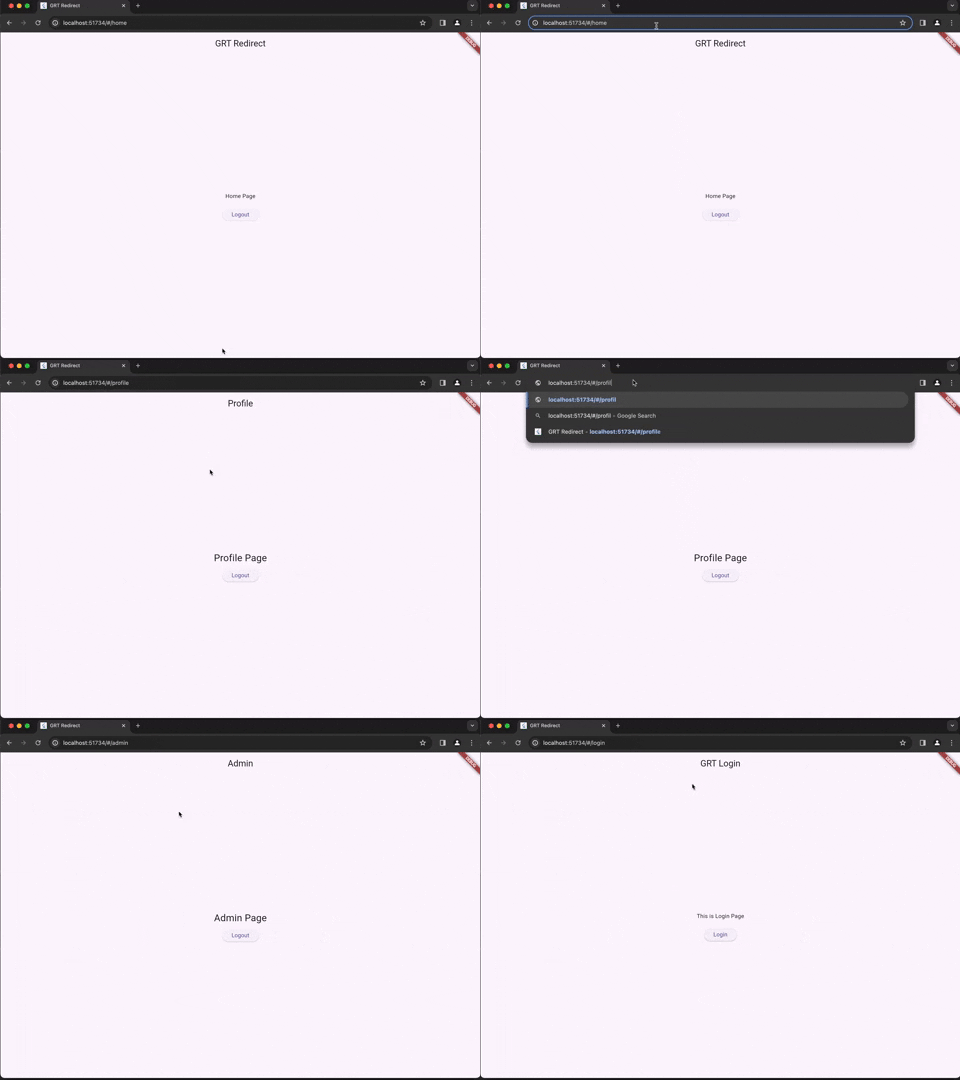
Perfect. As of now we are doing with Basic Redirection, Redirection using guards. We still have 3 tutorials where we discuss advanced concepts of Redirection using Riverpod. So keep tuned for more.
Comments
Join the discussionNo comments yet. Be the first to comment.
Go Router with Riverpod Tutorial
In here we'll look at a series of tutorials covering Go Router and Riverpod together.