Go Router + Riverpod Tutorials Series 4: Role Based Redirection

Now let's take a look at redirection depending on user roles
Source code: role_based_redirection
Now, Let's update our files starting with :
AuthNotifier and authProvider:
This is the updated AuthNotifier
class AuthNotifier extends StateNotifier<Map<String, dynamic>> {
  AuthNotifier() : super({'loggedIn': false, 'role': 'guest'});

  void login(String role) {
    state = {'loggedIn': true, 'role': role};
    print('State change to true,  Logged in as $role');
  }

  void logout() {
    state = {'loggedIn': false, 'role': 'guest'};
    print('State change to false, Logged out');
  }
}
This is the updated authProvider
final authProvider = StateNotifierProvider<AuthNotifier, Map<String, dynamic>>((ref) {
  return AuthNotifier();
});
Update app_router
First since we are getting a map instead of bool. Let's get a update our redirectIfNotLoggedIn()
FutureOr<String?> redirectIfNotLoggedIn(ProviderRef ref) {
  final loggedIn = ref.watch(authProvider)['loggedIn'];
  if (!loggedIn) {
    return '/login';
  }
  return null;
}
Now for the AdminPage() route. Let's make sure that only admin role should be able to see the page. So we'll update the redirect of the /admin route.
  GoRoute(
          path: '/admin',
          builder: (context, state) => const AdminPage(),
          redirect: (context, state) {
            final loggedIn = ref.watch(authProvider)['loggedIn'];
            final role = ref.watch(authProvider)['role'];
            if (!loggedIn) {
              return '/login';
            }
            if(role != 'admin'){
              return '/home';
            }
            return null;
          },
        )
Now let's update our existing pages to use the new roles property.
HomePage
class HomePage extends ConsumerWidget {
  const HomePage({super.key});

  @override
  Widget build(BuildContext context, WidgetRef ref) {
    return Scaffold(
      appBar: AppBar(
        title: const Text('GRT Redirect'),
      ),
      body: Center(
        child: Column(
          mainAxisAlignment: MainAxisAlignment.center,
          children: [
            const Text('Home Page'),
            const SizedBox(height: 20),
            ElevatedButton(
                onPressed: () {
                  ref.read(authProvider.notifier).logout();
                },
                child: const Text('Logout')),
            const SizedBox(height: 20),
            ElevatedButton(
                onPressed: () {
                  context.go('/home/profile');
                },
                child: const Text('Go to Profile')),
            const SizedBox(height: 20),
            ElevatedButton(
                onPressed: () {
                  context.go('/home/settings');
                },
                child: const Text('Go to Settings')),
            const SizedBox(height: 20),
            ElevatedButton(
                onPressed: () {
                  context.go('/admin');
                },
                child: const Text('Go to Admin')),
          ],
        ),
      ),
    );
  }
}
LoginPage:
We are updating the login page to allow logging in as either a regular user or an admin.
class LoginPage extends ConsumerWidget {
  const LoginPage({super.key});

  @override
  Widget build(BuildContext context, WidgetRef ref) {
    return Scaffold(
      appBar: AppBar(
        title: const Text('GRT Login'),
      ),
      body: Center(
        child: Column(
          mainAxisAlignment: MainAxisAlignment.center,
          children: [
            const Text('This is Login Page'),
            const SizedBox(height: 20),
            ElevatedButton(
                onPressed: () {
                  ref.read(authProvider.notifier).login('user');
                },
                child: const Text('Login as User')),
            const SizedBox(height: 20),
            ElevatedButton(
                onPressed: () {
                  ref.read(authProvider.notifier).login('admin');
                },
                child: const Text('Login as Admin')),
          ],
        ),
      ),
    );
  }
}
Alright so let's test the code
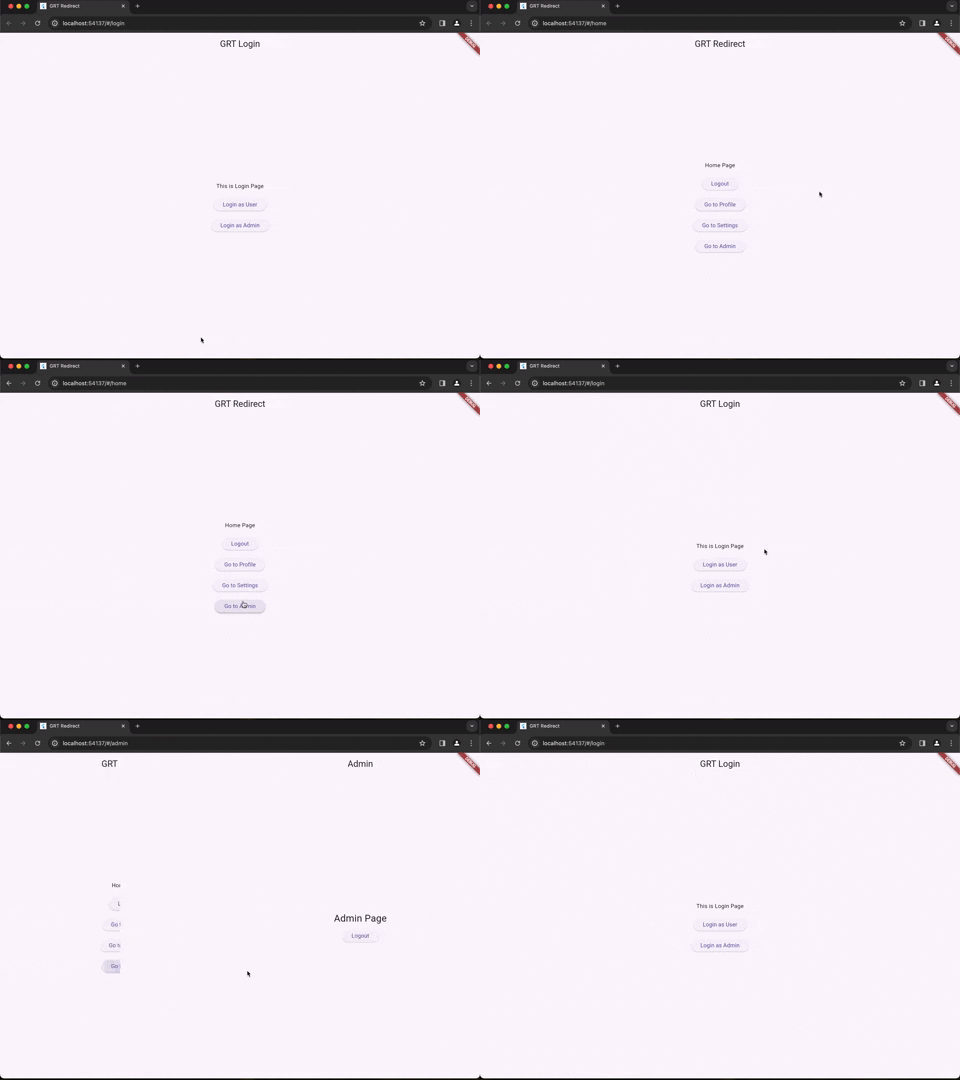
So this code works perfect. As always you can find the code for this tutorial here: role_based_redirection
Comments
Join the discussionNo comments yet. Be the first to comment.
Go Router with Riverpod Tutorial
In here we'll look at a series of tutorials covering Go Router and Riverpod together.