Flutter Riverpod Tutorial Part 3: Combining Providers

In this tutorial, we will learn how to combine multiple providers to create more complex states and manage dependencies between providers in Riverpod.
Combining Providers
Combining providers allows you to create more complex and interdependent states in your application. Riverpod makes it easy to manage dependencies between different providers. We are going to explore multiple scenarios of combining providers.
Managing User and Post Data
We are going to create an example where we manage both user and post data. We will simulate a scenario where posts are fetched based on the selected user.
Let's create a file user.dart
class User {
  final int id;
  final String name;

  User({required this.id, required this.name});

  factory User.fromJson(Map<String, dynamic> json) {
    return User(id: json['id'], name: json['name'],);
  }
}
Let's create another file post.dart
class Post {
  final int id;
  final String title;
  final String body;

  Post({
    required this.id,
    required this.title,
    required this.body,
  });

  factory Post.fromJson(Map<String, dynamic> json) {
    return Post(
      id: json['id'],
      title: json['title'],
      body: json['body'],
    );
  }
}
I am updating our basic_providers.dart to include this provider. This is similar to Future Provider from Lesson 2. The only difference is that instead of returning a List of Json we are returning List<User>>
final usersProvider = FutureProvider<List<User>>((ref) async {
  final response =
      await http.get(Uri.parse('https://jsonplaceholder.typicode.com/users'));

  if (response.statusCode == 200) {
    List jsonData = json.decode(response.body);

    return jsonData.map((user) => User.fromJson(user)).toList();
  } else {
    throw Exception('Failed to load user');
  }
});
Let's use StateProvider to manage the selected user:
final selectedUserProvider = StateProvider<User?>((ref)=> null);
Let's create a postsByUserProvider that depends on selectedUserProvider
final postsByUserProvider = FutureProvider<List<Post>>((ref) async {
  final selectedUser = ref.watch(selectedUserProvider);

  if (selectedUser == null) {
    return [];
  }

  final response = await http.get(Uri.parse(
      'https://jsonplaceholder.typicode.com/posts?userId=${selectedUser.id}'));

  if (response.statusCode == 200) {
    final jsonData = json.decode(response.body);

    return jsonData.map((post) => Post.fromJson(post)).toList();
  } else {
    throw Exception('Failed to load posts');
  }
});
Let's create users_posts_page.dart to display users and posts based on the user:
class UserPostsPage extends ConsumerWidget {
  const UserPostsPage({super.key});

  @override
  Widget build(BuildContext context, WidgetRef ref) {
    final userPosts = ref.watch(postsByUserProvider);
    final usersListAsyncValue = ref.watch(usersProvider);

    return Scaffold(
      appBar: AppBar(
        title: const Text('User Posts Page'),
      ),
      body: SizedBox(
        width: double.infinity,
        child: Column(
          children: [
            usersListAsyncValue.when(
              data: (users) {
// In here we are selecting the users based on drop down
                return DropdownButton<User>(
                    hint: const Text('Select a User'),
                    items: users
                        .map((user) => DropdownMenuItem(
                            value: user, child: Text(user.name)))
                        .toList(),
                    onChanged: (user) {
                      ref.read(selectedUserProvider.notifier).state = user;
                    });
              },
              error: (error, stackTrace) => Center(
                child: Text('Error: $error'),
              ),
              loading: () => const Center(
                child: CircularProgressIndicator(),
              ),
            ),
            Expanded(
//Only when a user is selected we'll get the posts from that user
              child: userPosts.when(
                data: (posts) {
                  return ListView.builder(
                      itemCount: posts.length,
                      itemBuilder: (context, index) {
                        final post = posts[index];
                        return ListTile(
                          title: Text(post.title),
                          subtitle: Text(post.body),
                        );
                      });
                },
                error: (error, stackTrace) => Center(
                  child: Text('Error: $error'),
                ),
                loading: () => const Center(
                  child: CircularProgressIndicator(),
                ),
              ),
            ),
          ],
        ),
      ),
    );
  }
}
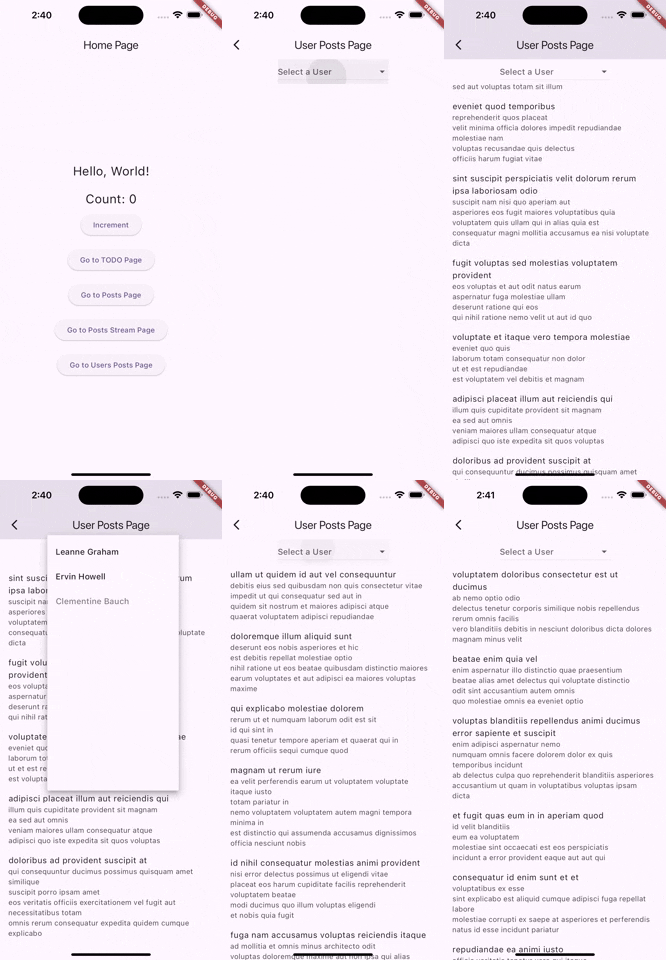
And finally here's the output:
You can find the source code for the app here: riverpod_combining_providers
Comments
Join the discussionNo comments yet. Be the first to comment.
Flutter Riverpod Tutorial
In this series, I'll cover every concept of Riverpod in a comprehensive manner, so that any user can understand total ins and outs of any Riverpod concept.